I Failed an Interview Because of translatesAutoresizingMaskIntoConstraints. Here is What I Learned.

So, picture this.
I’m sitting in a Zoom interview for a dream iOS role. The lighting is good, my background is blurred to hide the laundry pile, and I’m feeling confident. We breeze through the easy stuff, ARC, View Controller lifecycles, weak vs unowned. I am crushing it.
Then, the interviewer leans in (virtually) and asks a question that sounds simple:
“We all type
view.translatesAutoresizingMaskIntoConstraints = false. But tell me, under the hood… what is it actually translating? And how does that math work?”
My brain went 404.
I stammered something about “making Auto Layout work” and “stopping the crashy-crashy.” The interviewer smiled that polite, pitying smile that says, “We will not be moving forward with your application.”
I didn’t get the job.
But out of spite and a desperate need for redemption, I spent days digging into the documentation and the history of UIKit to answer that question. It turns out, this property isn’t just a toggle, it’s a time machine.
Here is the deep dive I wish I could have given during that interview.
The “Translation” in Question
To understand the “Translation,” we have to look at what we are translating from.
Before iOS 6 (2012), we lived in the dark ages of Springs and Struts. We didn’t have Auto Layout anchors. We had autoresizingMask.
When you set translatesAutoresizingMaskIntoConstraints = true (which is the default for any view created in code), you are telling the system:
“Please look at my old-school
frameand myautoresizingMask, and convert them into Auto Layout constraints for me automatically at runtime.”
It is a compatibility bridge. It takes the “Old World” logic and translates it into “New World” constraints so the modern layout engine can understand it.
Era 1: The Wild West of Frames (2008–2011)
In the beginning, there was CGRect.
When the iPhone OS (before it was called iOS) first launched, the world was simple. There was only one screen size: 3.5 inches. 320 points wide, 480 points tall.
Developers didn’t need a complex layout engine. We just used Frames.
// The "Good" Old Days
myView.frame = CGRect(x: 20, y: 50, width: 280, height: 100)
You told the view exactly where to sit, pixel for pixel. If you rotated the phone, you just manually recalculated the math. It was tedious, but it worked because the hardware never changed.
Era 2: Springs and Struts
As things got slightly more complex (hello, iPad), Apple gave us a tool called Autoresizing Masks, affectionately known as “Springs and Struts.”
Imagine a view inside a parent view. You could tell it:
- “Stick to the left edge” (a Strut).
- “Stretch your width if the parent gets wider” (a Spring).
In code, this looked like:
myView.autoresizingMask = [.flexibleWidth, .flexibleBottomMargin]
This was the “Old World.” It was fast, efficient, and capable of handling simple resizing. But it was dumb. It couldn’t handle things like “make this button 50% of the width of that image,” or “keep these three labels aligned but push the middle one down if the text is too long.”
Era 3: The Auto Layout Revolution (2012)
With iOS 6, Apple introduced Auto Layout.
Suddenly, we weren’t setting frames anymore. We were defining relationships. “A is equal to B times 2 plus 10.” It was a mathematical solver (the Cassowary algorithm) running inside your phone.
But here was the problem: Apple couldn’t just break every existing app.
Millions of apps were built using Springs and Struts. If Apple suddenly switched everyone to Auto Layout, every old app would crash or look terrible because they didn’t have any constraints set up.
They needed a bridge. A translator.
The Translator: translatesAutoresizingMaskIntoConstraints
This is where our long-named hero enters the story.
The property translatesAutoresizingMaskIntoConstraints is the backward-compatibility bridge that connects the Old World (Springs & Struts) to the New World (Auto Layout).
Here is exactly what it does:
When this property is true (the default for code), the system looks at your “Springs and Struts” (your autoresizingMask) and automatically converts them into Auto Layout constraints for you at runtime.
Under the Hood: The Algorithm
This is the part where I should have sounded smart.
When this property is true, the system generates a specific subclass of constraints called NSAutoresizingMaskLayoutConstraint. These are not your typical constraints; they are immutable and generated entirely based on the view’s frame and autoresizingMask.
Let’s look at the actual logic using code.
Scenario 1: The “Rigid” Box (Default)
Imagine you create a view programmatically. By default, its autoresizingMask is [] (empty).
let view = UIView(frame: CGRect(x: 20, y: 20, width: 100, height: 100))
// view.autoresizingMask is .none
// view.translatesAutoresizingMaskIntoConstraints is true
Under the hood, because the mask is empty (no springs, no struts), the system effectively says: “This view must stay exactly at (20, 20) with size (100, 100).”
It generates the equivalent of these constraints for you:
// Pseudo-code of what the System generates automatically:
[
    view.leadingAnchor.constraint(equalTo: superview.leadingAnchor, constant: 20),
    view.topAnchor.constraint(equalTo: superview.topAnchor, constant: 20),
    view.widthAnchor.constraint(equalToConstant: 100),
    view.heightAnchor.constraint(equalToConstant: 100)
]
This is why, if you try to change the width later using anchors without setting the flag to false, you get a conflict. You are fighting against these invisible, system-generated constraints.
Scenario 2: The “Flexible” Button (Springs)
Now, let’s look at a “Spring.” In the old days, if we wanted a view to stretch with its parent, we did this:
let flexibleView = UIView(frame: CGRect(x: 0, y: 0, width: 320, height: 50))
flexibleView.autoresizingMask = [.flexibleWidth]
// This is the "Spring"
If translatesAutoresizingMaskIntoConstraints is true, the system looks at .flexibleWidth and generates a different set of math. It no longer creates a widthAnchor.constraint(equalToConstant: 320).
Instead, it generates a relationship constraint:
// Pseudo-code of what the System generates for .flexibleWidth:
[
    // It pins the left
    view.leadingAnchor.constraint(equalTo: superview.leadingAnchor, constant: 0),

    // It pins the right (because width is flexible, it attaches to both edges!)
    view.trailingAnchor.constraint(equalTo: superview.trailingAnchor, constant: 0),

    // Height and Top remain fixed constants
    view.topAnchor.constraint(equalTo: superview.topAnchor, constant: 0),
    view.heightAnchor.constraint(equalToConstant: 50)
]
The translation logic is essentially:
- Read the
frameto get the current position/size constants. - Read the
autoresizingMaskto determine which anchors to pin. - If
.flexibleWidthis OFF -> Create a constant Width constraint. - If
.flexibleWidthis ON -> Create constraints pinning Leading AND Trailing to the superview.
Why My Interview Answer Failed
The reason we have to set it to false is to prevent Double Constraint Syndrome.
When you write modern Auto Layout code, like this:
// My modern code
myView.widthAnchor.constraint(equalToConstant: 200).isActive = true
If you forget to flip the switch, the system is also doing its job in the background based on the initial frame.
The debug console error log, which I used to ignore, but now read like scripture, actually tells you this. If you look closely at a crash log, you will often see something like:
Unable to satisfy simultaneous constraints.
(
    "<NSAutoresizingMaskLayoutConstraint:0x6000021... h=--& v=--& UIView:0x... width=100>",
    "<NSLayoutConstraint:0x6000021... UIView:0x... width=200>"
)
See that NSAutoresizingMaskLayoutConstraint? That is the ghost of the Old World. That is the system saying, “I promised the frame would be 100!” while your new code screams, “I want it to be 200!”
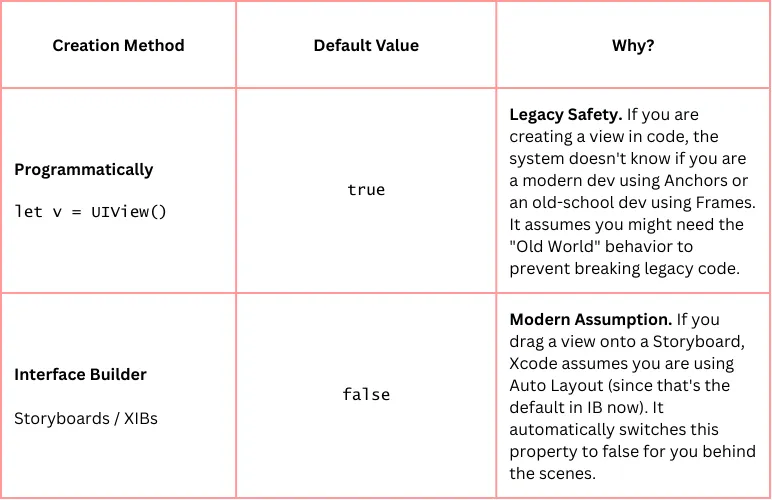
The “Gotcha” that confuses everyone
To make matters worse (or funnier?), the default value changes depending on how you create the view.
- Interface Builder (Storyboard/XIB): Xcode assumes you are smart and using Auto Layout. It sets
translates... = falseautomatically. - Programmatic (
**UIView()**): Xcode assumes you might be a dinosaur porting code from 2010. It setstranslates... = trueautomatically.
Summary
So, what is translatesAutoresizingMaskIntoConstraints really?
It is a runtime generator that converts bitmask flags (autoresizingMask) into linear equations (NSLayoutConstraint).
We set it to false not just because “StackOverflow said so”, but because we want full control over the system of equations defining our UI. We are telling the OS: “I don’t need your legacy translation service. I will handle the layout myself.”
I might have failed that interview, but at least now I know what that 37-character property actually does. And hopefully, next time someone asks you, you won’t freeze up like I did.