Using Double (or Float) in a Banking App? That's How Money Disappears.
Hi! I’m one of those developers lucky enough to experience building a banking app on iOS. If you are reading this, you probably write code. And if you write code, you probably share my recurring nightmare: accidentally transferring 0.00000001 Rupiah into the void because I didn’t understand how computers count, followed immediately by auditors kicking down my door.
If you are terrified of math but love Swift, or if you just want to know why 0.1 + 0.2 refuses to equal 0.3 (spoiler: it really, really doesn’t), welcome.
We are going to talk about Number Base Systems, Floating Point Error, and why Double is the secret enemy of your bank account.
I’m not great at math. I’m just trying not to accidentally delete some money from a customer’s savings and get a surprise visit from compliance. Let’s survive this together.
Part 1: Why Do Computers Count Weirdly?
First, we need to accept that you and your computer speak entirely different languages. It’s not the computer’s fault, it’s just doing its best.
Base-10 (Decimal): The Human Way
Humans count in Base-10. Why? Mostly because we have ten fingers. If we were cartoon characters with three fingers on each hand, we would probably count in Base-6.
- Digits: 0, 1, 2, 3, 4, 5, 6, 7, 8, 9
- The Logic: When we reach 9 and add 1, we run out of distinct symbols. So, we reset to 0 and carry a “1” to the next column (making 10).
Base-2 (Binary): The Computer Way
Computers are essentially just rocks that we trapped lightning inside of. They don’t have fingers, they have switches. Electricity is either ON or OFF. High voltage or low voltage. True or False.
- Digits: 0, 1
- The Logic: When a computer counts, it looks like this:
0, 1, 10, 11, 100....
Base-16 (Hexadecimal): The Programmer Way
You’ll see this occasionally. Because reading 11111111 hurts human eyes, we compress it into Base-16.
- Digits: 0–9 and A-F.
- Use Case: We usually use this for colors (like
#FFFFFF) or memory addresses.
The Problem: We write our banking apps thinking in Base-10 (money), but the CPU runs in Base-2. Usually, this conversion is fine. But when we start using fractions, like cents, things get messy.
Part 2: The Great Floating Point Disaster
Here is the most important thing to remember. This specific quirk is the reason banking apps have to be so careful.
Open a Swift Playground and type this:
let wallet: Double = 0.1
let deposit: Double = 0.2
let balance = wallet + deposit

print(balance == 0.3)
// Result: false

print(balance)
// Result: 0.30000000000000004
Wait, what?
Where did that extra 0.00000000000000004 come from? Did we just steal a fraction of a penny?
The Deep Dive: Why is 0.1 Infinite?
This part confuses everyone, so let’s break it down gently.
In Base-10 (Human Math), some numbers are impossible to write perfectly. Take 1/3. If you write it as a decimal, it’s 0.3333333… forever. You eventually run out of paper, stop writing, and the number is slightly inaccurate.
In Base-2 (Computer Math), the exact same thing happens, but with different numbers.
Computers build fractions by adding up halves:
1/2, 1/4, 1/8, 1/16, 1/32…
(0.5, 0.25, 0.125, 0.0625…)
If you try to make the number 0.1 using only these halves, you technically can’t do it perfectly.
- You take 0.0625 (1/16)
- You add 0.03125 (1/32)
- You keep adding smaller and smaller slices…
You end up with a repeating pattern: 0.0001100110011…
Because your computer does not have infinite RAM, it has to chop that number off eventually. That “chop” introduces a tiny, microscopic error. It stores 0.1 as roughly 0.1000000000000000055.
The Takeaway: Double and Float are basically “scientific guesses.” They are fast, but they are liars.
If you want to read more about this floating point error, you might want to check this website https://0.30000000000000004.com/.
Part 3: The Hero We Need: Decimal
If we use Double for an Indonesian bank, and we calculate interest on IDR 10,000,000, that tiny error accumulates. Eventually, the database doesn’t match the vault, and the database admin starts crying.
Swift gives us the Decimal type to save us.
How does Decimal work? Decimal refuses to convert your number into Binary fractions. It stores numbers in Base-10, just like you do on paper. It essentially stores 10.5 as: “The number is 105, and the dot is at position -1.”
Because it calculates in Base-10, it does not have the “infinite repeating fraction” problem for numbers like 0.1.
How to use it (and not mess it up)
import Foundation

// ❌ BAD: Never initialize Decimal from a Double
// The Double is already broken before the Decimal sees it
let brokenPrice = Decimal(10.50)

// ✅ GOOD: Use String
// This preserves the exact Base-10 representation
let gorenganPrice = Decimal(string: "2500.50")!
let quantity = Decimal(string: "3")!

let totalCost = gorenganPrice * quantity
print(totalCost)
// Result: 7501.5
// (Exact! No .00000004 nonsense)
Why is Decimal slower? Double is handled directly by the hardware (CPU). Decimal is calculated by software. It is much slower. But in banking, we care more about accuracy than speed .
Part 4: The Art of Not Looking Like a Scam (Formatting)
So, you calculated the number correctly. Now you have 10000000.5.
If you show the user “Rp 10000000.5”, they will delete your app. It looks sketchy. Real money looks like “Rp 10.000.000,50”.
Notice the dots (.) for thousands and the comma (,) for decimals. This is the Indonesian standard. In the US, it’s the opposite.
Do not try to code this yourself using string replacement. You will mess it up. Use NumberFormatter.
let myMoney: Decimal = 12500500.75

let formatter = NumberFormatter()
formatter.numberStyle = .currency
formatter.locale = Locale(identifier: "id_ID") // Indonesian Locale

let display = formatter.string(for: myMoney)
// Result: "Rp 12.500.500,75"
This handles negative numbers, currency symbols, and grouping automatically. It makes your app look like a legitimate financial institution rather than a weekend hobby project.
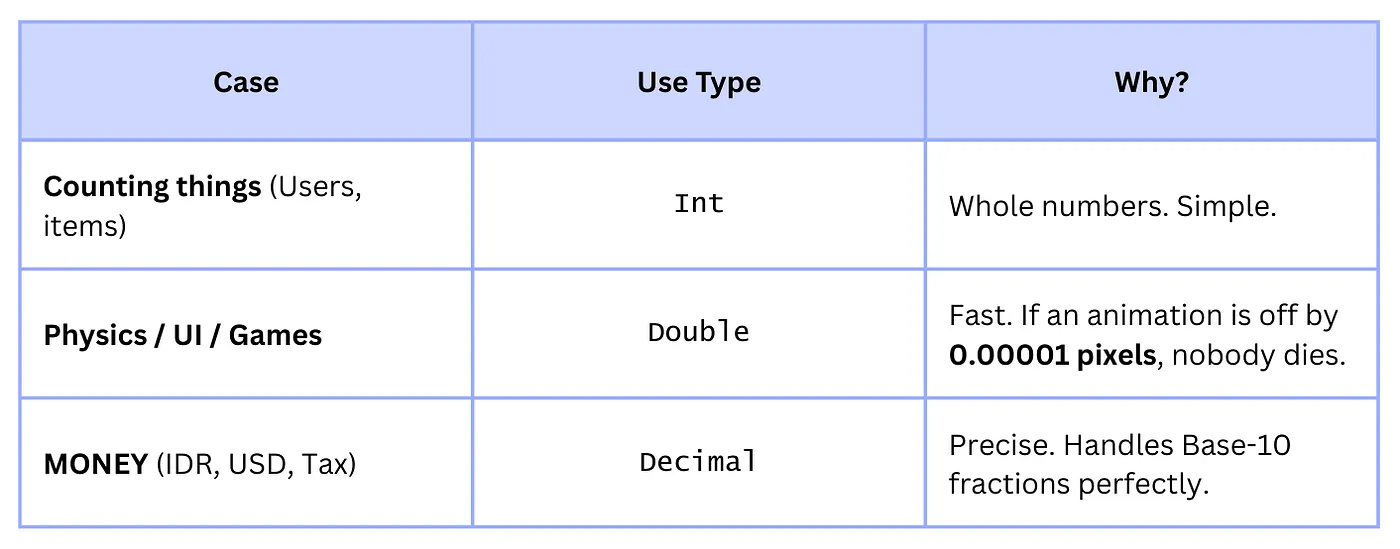
Part 5: The Cheat Sheet
Here is a summary so you don’t have to memorize the math:
Part 6: The Ultimate Safety Net: The Money Struct
We have fixed the math error by using Decimal. But we still have a “Human Error” problem.
Imagine this scenario:
let salary: Decimal = 10_000_000 // IDR
let bonus: Decimal = 500         // USD
let total = salary + bonus       // Result: 10,000,500
Congratulations. You just treated 500 US Dollars (approx. IDR 7.5 Million) as 500 Rupiah (approx. enough to buy one piece of candy). You have effectively stolen your employee’s bonus.
Decimal is just a number. It doesn’t know what it is counting. To fix this, we need to glue the Value and the Currency together so they can never be separated.
The “Don’t Mix Currencies” Implementation
We are going to create a Money struct. It will refuse to let you add different currencies together. It will scream at you (via errors) instead of silently destroying your career.
import Foundation

// 1. Define your supported currencies clearly
enum Currency: String {
    case idr = "IDR"
    case usd = "USD"
    case sgd = "SGD"

    var localeIdentifier: String {
        switch self {
        case .idr: return "id_ID"
        case .usd: return "en_US"
        case .sgd: return "en_SG"
        }
    }
}

// 2. The Safe Wrapper
struct Money {
    let amount: Decimal
    let currency: Currency

    // Initialize safely from Double (using our string trick from Part 3)
    init(_ amount: Double, currency: Currency) {
        // Handle the NaN/Infinity edge case
        if amount.isNaN || amount.isInfinite {
            self.amount = 0
            self.currency = currency
            print("⚠️ Attempted to create Money from Infinity/NaN. Defaulting to 0.")
        } else {
            self.amount = Decimal(string: String(amount)) ?? 0
            self.currency = currency
        }
    }

    // Initialize directly from Decimal if you have it
    init(_ amount: Decimal, currency: Currency) {
        self.amount = amount
        self.currency = currency
    }

    // 3. Formatting is built-in (No more hunting for formatters)
    func formatted() -> String {
        let formatter = NumberFormatter()
        formatter.numberStyle = .currency
        formatter.locale = Locale(identifier: currency.localeIdentifier)
        formatter.currencyCode = currency.rawValue

        // Paranoid Rounding: Always Round Half Up
        formatter.roundingMode = .halfUp
        formatter.maximumFractionDigits = currency == .idr ? 0 : 2 // IDR usually doesn't use decimals

        return formatter.string(for: amount) ?? "\(currency.rawValue) \(amount)"
    }
}

// 4. The Magic: Operator Overloading
// This teaches Swift how to "add" two Money objects
extension Money {
    static func + (lhs: Money, rhs: Money) -> Money {
        // The Guardrail:
        guard lhs.currency == rhs.currency else {
            // In a real app, you might throw an error.
            // Here, we crash during development so we catch it early.
            fatalError("🚨 CRITICAL ERROR: You tried to add \(lhs.currency) to \(rhs.currency). Do you want to go to jail?")
        }

        return Money(lhs.amount + rhs.amount, currency: lhs.currency)
    }

    // You can implement - and * similarly
}
Part 7: Safe API Integration (Codable)
Your backend will probably send the money as two separate fields in JSON. If you use the standard Codable synthesis, you’ll get an error because Decimal does not conform to Codable by itself, and converting the Double JSON field to Decimal has the binary error problem.
We need a custom implementation of Decodable to force the amount to be read as a String (or another number type that preserves precision) and then safely convert it to Decimal.
Making Money Safely Codable
// We add Codable conformance to the struct definition
struct Money: Codable {
    // ... (All previous definitions: amount, currency, inits, formatted()) ...

    // MARK: - Codable Implementation

    // 1. Define the keys we expect in the JSON payload
    private enum CodingKeys: String, CodingKey {
        case amount
        case currency
    }

    // 2. Custom Decoder (This is the critical part)
    init(from decoder: Decoder) throws {
        let container = try decoder.container(keyedBy: CodingKeys.self)

        // --- Currency is simple (read as String/Enum) ---
        self.currency = try container.decode(Currency.self, forKey: .currency)

        // --- Amount is complex (must be precision-safe) ---

        // The safest API format is usually a String, but sometimes they send a Double.
        // We attempt to decode the 'amount' as a String first.
        do {
            let amountString = try container.decode(String.self, forKey: .amount)
            self.amount = Decimal(string: amountString) ?? 0
        } catch {
            // If the String decoding failed, it might be a simple number (Double/Int).
            // We read it as a Double, but immediately convert it to Decimal via String.
            let amountDouble = try container.decode(Double.self, forKey: .amount)

            // Re-using our safe-conversion logic from init(_:currency)
            if amountDouble.isNaN || amountDouble.isInfinite {
                 self.amount = 0
                 print("⚠️ Decoded Infinity/NaN from JSON. Defaulted amount to 0.")
            } else {
                 self.amount = Decimal(string: String(amountDouble)) ?? 0
            }
        }
    }

    // 3. Custom Encoder (How to write the object back to JSON)
    func encode(to encoder: Encoder) throws {
        var container = encoder.container(keyedBy: CodingKeys.self)

        // When sending money back, it's best practice to send the amount as a precise string.
        try container.encode(self.amount.description, forKey: .amount)
        try container.encode(self.currency, forKey: .currency)
    }
}
// Note: You would place the operator overloads (static func +) here as well.
Usage Example
If your backend sends this:
{
  "transaction_id": 1234,
  "total_fee": {
    "amount": "12500000.75",
    "currency": "IDR"
  }
}
You can now decode it safely:
struct Transaction: Codable {
    let transactionID: Int
    let totalFee: Money
}

// Assume data is the raw JSON data
let decodedTransaction = try JSONDecoder().decode(Transaction.self, from: data)

print(decodedTransaction.totalFee.formatted())
// Result: Rp 12.500.001 (Rounded up from .75, and decimals removed for IDR)
The custom Codable implementation ensures that the precise string "12500000.75" is never processed as a faulty Double before becoming a safe Decimal.
Conclusion
So, that’s it.
- Computers use Binary and struggle with simple fractions like
0.1. - Double is a liar (but a fast one).
- Decimal is your friend.
- NumberFormatter makes you look professional.
- The
Moneystruct prevents mixing currencies and handles JSON safety.
Now, you already know about how to avoid the floating point errors and currency mix-ups. Hope you would never get in trouble. Good luck!
Thank you for reading!